
29 May 2025

5 min read
SELinux: Architecture, Use Cases, and Visualizations
-
29 May 2025
5 min read
SELinux: Architecture, Use Cases, and Visualizations
-
What is SELinux?
SELinux (Security-Enhanced Linux) is a Linux kernel security module that enforces mandatory access control (MAC) policies. It provides a robust way to confine processes and users, limiting the potential damage that could be caused by exploits or misconfigurations
Key Features of SELinux
- Mandatory Access Control (MAC): Unlike traditional discretionary access control (DAC), where users set permissions on files and resources, SELinux enforces policies that restrict how processes interact with each other and with system resources, regardless of user permissions.
- Fine-Grained Security Policies: SELinux policies define detailed rules about which processes can access which files, sockets, ports, etc.
- Labels: Every process and resource (files, ports, etc.) is labeled with security contexts, and policies specify interactions based on these labels.
SELinux Architecture
SELinux architecture is modular and integrates deeply with the Linux kernel. The main components are:
- Subject: The process or application requesting access.
- Object Manager: Controls access to a resource (e.g., file, socket).
- Security Server: Makes access decisions based on the security policy.
- Access Vector Cache (AVC): Caches recent access decisions for performance.
- Security Policy: Set of rules that define what is allowed or denied.
Here’s a simple diagram of the core SELinux components:
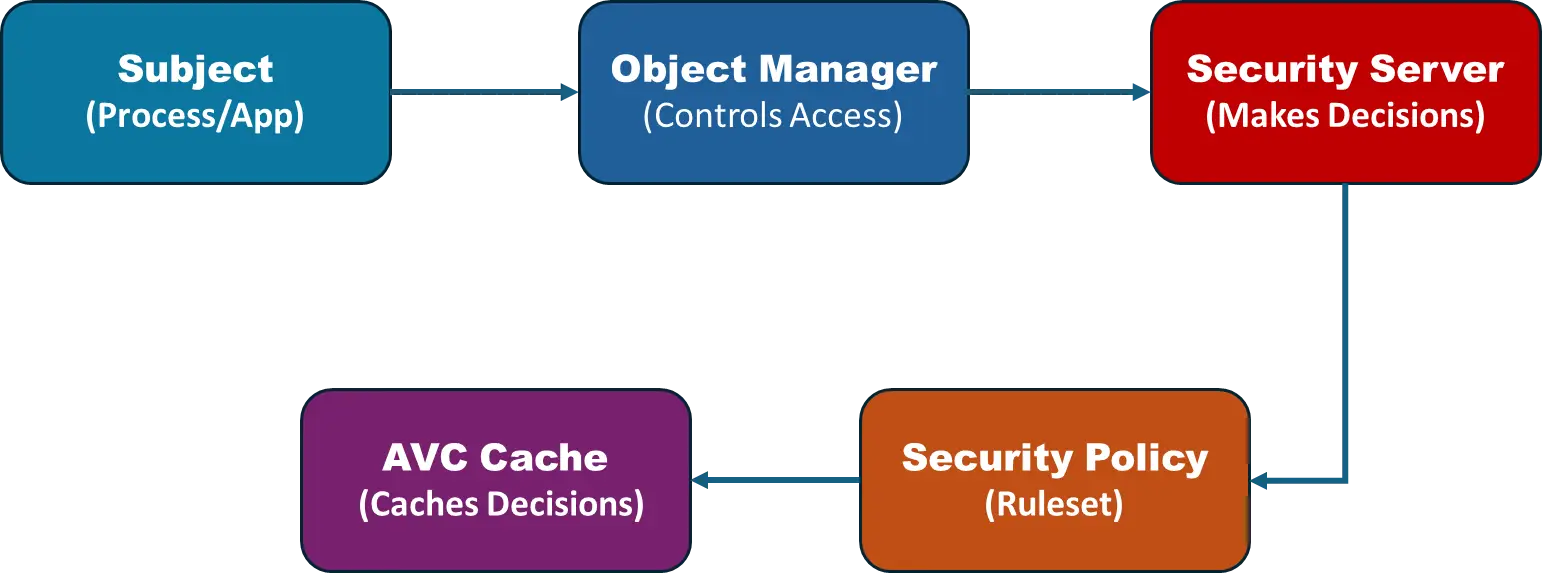
This flow shows how a process (subject) requests access to a resource, the Object Manager queries the Security Server, which checks the policy and may use the AVC for fast lookups
How SELinux Works
When a process tries to access a file or network socket, SELinux intercepts the request in the kernel. It checks the security policy (loaded at boot) to see if the action is allowed. If not, the operation is blocked and an error is returned. All decisions are cached in the AVC for faster future access
SELinux Modes
- Enforcing: Blocks unauthorized actions (default).
- Permissive: Logs unauthorized actions but does not block them (useful for troubleshooting).
- Disabled: SELinux is turned off.
Configuration
- SELinux policies are managed via tools like setenforce, semanage, and configuration files like /etc/selinux/config.
- SELinux status can be checked with commands such as getenforce or sestatus.
Benefits
- Reduces the risk of privilege escalation and unauthorized access.
- Limits the damage caused by compromised services or applications.
- Provides detailed auditing capabilities for security monitoring.
Use Cases
1.Web Server Security
- Scenario: A web server (like Apache) runs as a confined process.
- Benefit: Even if an attacker exploits a vulnerability in Apache, SELinux restricts the process to only the files and network ports it needs, preventing access to sensitive system files
2.Database Server Protection
- Scenario: A database service (like PostgreSQL) is limited in what it can access.
- Benefit: Prevents data leaks or unauthorized modifications by confining the database process to its own directories and files
3.Container and Cloud Security
- Scenario: SELinux is used in containerized environments (like Docker or Kubernetes).
- Benefit: Provides an additional layer of isolation between containers, reducing the risk of container breakout attacks
4.Enterprise System Hardening
- Scenario: Large organizations use SELinux to enforce strict access controls across servers.
- Benefit: Reduces the risk of lateral movement if an attacker gains access to one service
SELinux Policy Example
SELinux policies are written in a special language. A simple rule might look like:
allow httpd user_home_t:file read;
This means the httpd process (web server) is allowed to read files labeled user_home_t
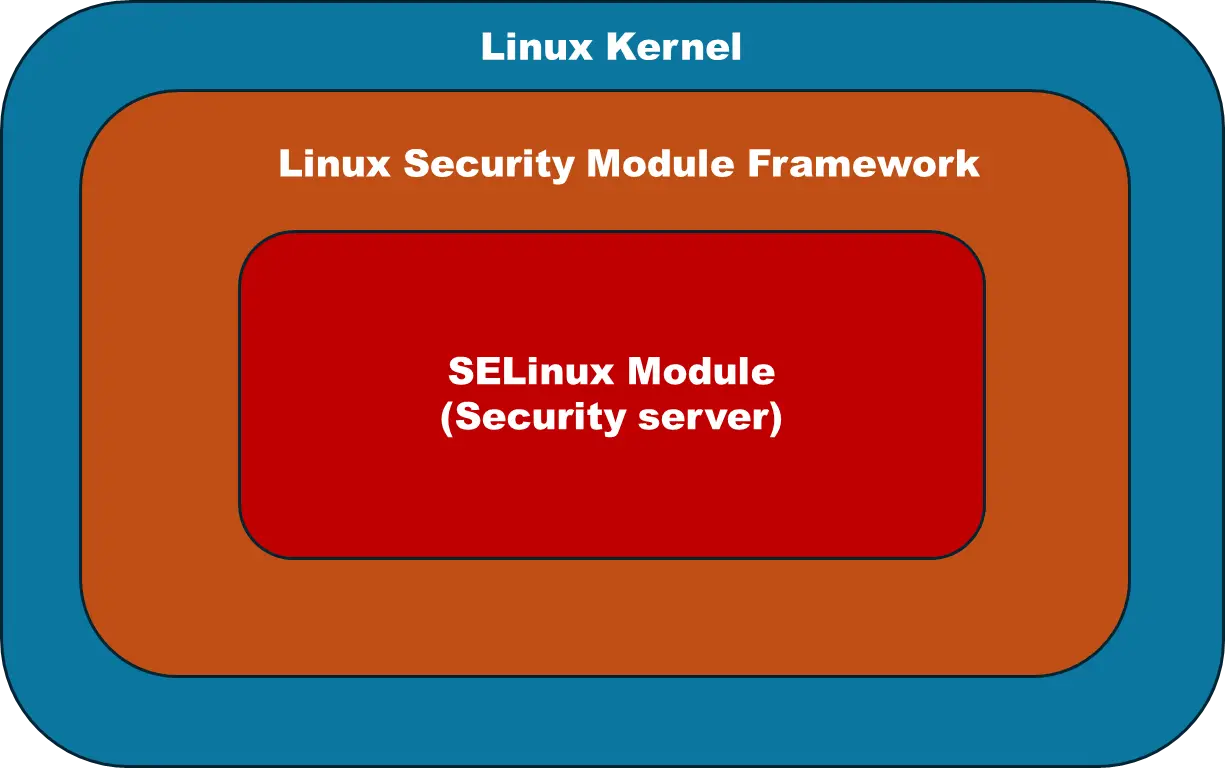
SELinux in the Kernel
SELinux is implemented as a Linux Security Module (LSM) in the kernel. It hooks into system calls to intercept and check access requests
Summary Table
| Feature | Description |
|---|---|
| Type | Mandatory Access Control (MAC) |
| Policy Enforcement | Enforcing, Permissive, Disabled |
| Key Components | Subject, Object Manager, Security Server, AVC, Security Policy |
| Main Use Cases | Web/Database servers, Containers, Enterprise hardening |
| Configuration | Policy-based, customizable |
| Security Benefit | Confines processes, reduces attack surface, prevents lateral movement |
Recommended Blogs

14 May 2025
5 min read
Exploring Zephyr RTOS: A Lightweight, Scalable Real-Time Operating System for the Modern IoT Era

11 March 2026
5 min read
Hardware Emulation in Modern VLSI Verification: Enabling Hardware–Software Co-Development and Reducing Costly Silicon Respins
21 May 2025
5 min read
Zephyr OS Security: Architecture, Features, and the Future of IoT Security
Build with the Most Trusted Engineering Partner

Delivers cutting-edge embedded solutions, from firmware development to wireless protocols, ensuring reliability and innovation.

Resources
Copyright © 2026
Privacy Policy
Terms of Service
Delivers cutting-edge embedded solutions, from firmware development to wireless protocols, ensuring reliability and innovation.


Resources
Privacy Policy
Terms of Service
Copyright © 2026