


30 May 2025

5 min read
WLAN Analysis using TShark and Machine Learning - part 1
-
30 May 2025
5 min read
WLAN Analysis using TShark and Machine Learning - part 1
-

Combining TShark for wireless packet capture with machine learning (ML) enables advanced, automated analysis of wireless network traffic—ranging from intrusion detection to traffic classification and anomaly detection. Here’s how these technologies integrate and what practical workflows look like:
TShark for Wireless Data Collection
1.Wireless Packet Capture:
TShark can be used to capture raw wireless (802.11) frames by putting your wireless interface into monitor mode. This allows you to collect management, control, and data frames, which are essential for comprehensive wireless analysis
2.Filtering and Output:
TShark can be used to filter for specific frame types (e.g., beacons, probe requests) and export the results in structured formats (CSV, JSON) for further processing
3.Automation:
TShark is scriptable, making it easy to automate captures, extract features, and feed data into ML pipelines
Machine Learning for Wireless Network Analysis
• Feature Extraction:
TShark output can be parsed to extract features such as frame types, MAC addresses, signal strength (RSSI), SSIDs, and timing information. These features form the input for ML models
• Model Training and Deployment:
- Anomaly Detection: ML models (e.g., Random Forest, Gradient Boosting) can be trained to detect unusual patterns or intrusions in wireless traffic
- Traffic Classification: ML can classify wireless frames or flows (e.g., distinguishing between normal traffic, rogue APs, or attacks like deauthentication).
- Root Cause Analysis: ML can help correlate patterns in large packet captures to identify root causes of failures or performance issues
- Real-Time and Batch Analysis: TShark can be integrated into ML pipelines for both real-time (streaming) and batch (offline) analysis, depending on your monitoring needs
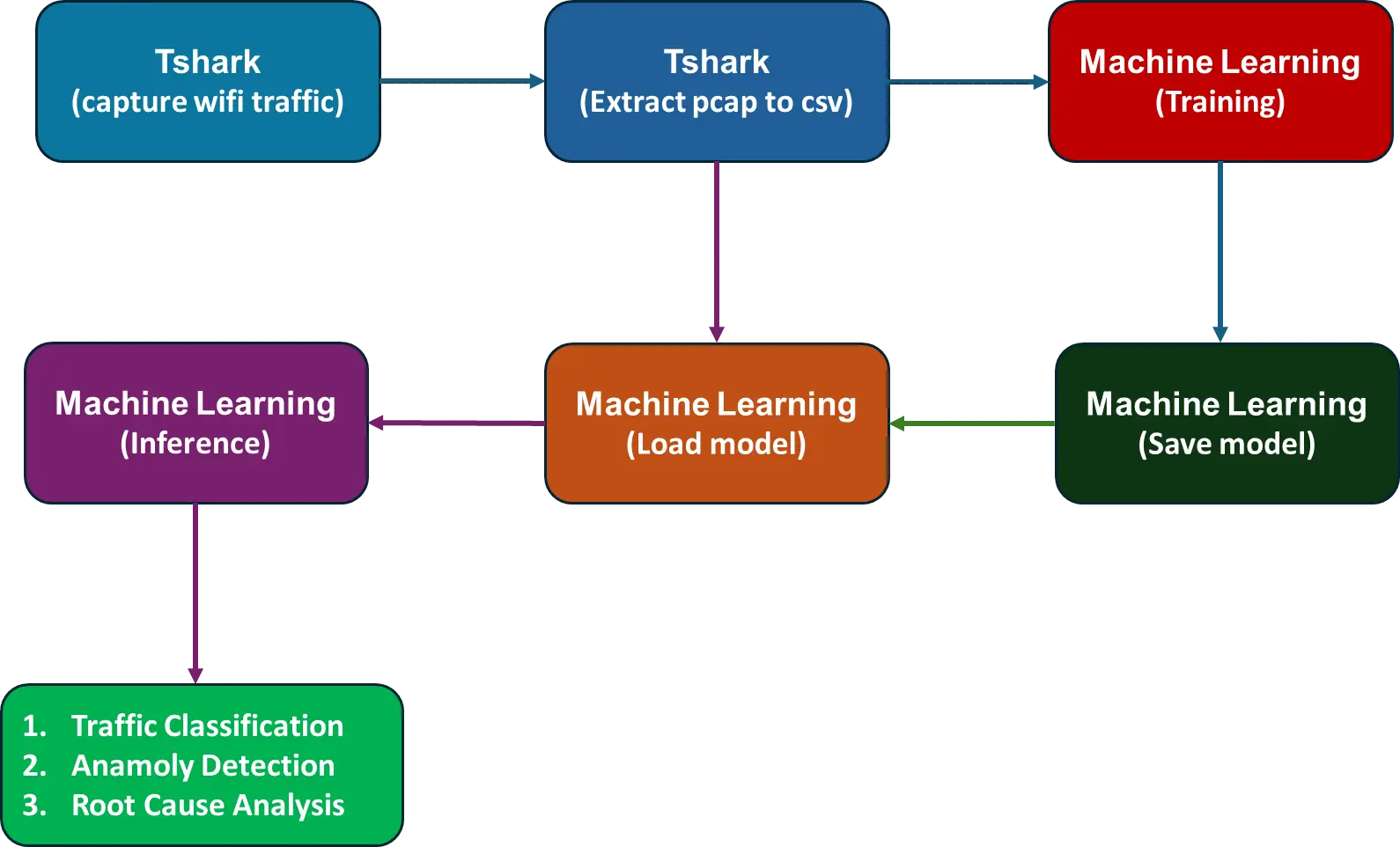
Example Workflow
1. Enable Monitor Mode and Capture Traffic:
sudo tshark -i wlan0mon -w wireless_capture.pcap
2. Extract Features for ML:
Bash
tshark -r wireless_capture.pcap -T fields -e frame.time -e wlan.sa -e wlan.da -e wlan.fc.type_subtype -e wlan.ssid -e wlan.analysis.duration -e wlan.channel -e radiotap.channel.freq -e radiotap.dbm_antsignal > features.csv
3.Train and Deploy ML Model:
- Use Python (e.g., scikit-learn, TensorFlow) to read features.csv, preprocess data, and train a model for anomaly detection or classification.
- Deploy the model to analyze live TShark output or stored captures.
Important Features for Identifying Wi-Fi Issues
| Feature | Description & Why It Matters |
|---|---|
| Signal Strength (RSSI) | Measures the power level of the received signal. Weak signals cause connectivity and throughput problems. |
| SNR (Signal-to-Noise Ratio) | Indicates signal quality relative to background noise. Low SNR leads to packet loss and retransmissions. |
| Frame Type/Subtype | Differentiates management, control, and data frames. Helps identify issues like authentication failures or roaming. |
| Packet Loss / Retransmissions | High packet loss or many retransmissions indicate interference or poor link quality. |
| Latency / Response Time | Increased latency can indicate congestion or poor wireless conditions. |
| Channel / Frequency | Congested or overlapping channels cause interference and degrade performance. |
| Connection State / FSM State | States like Associating, Authenticating, Connected, Roaming help pinpoint where connection failures occur. |
| Throughput / Data Rate | Low throughput may indicate interference, weak signal, or hardware issues. |
| Security Status | Authentication or encryption failures can cause connectivity problems. |
| SSID / BSSID | Identifies the network and access point; helps detect rogue APs or misconfigurations. |
| Duration / Timestamp | Timing information helps correlate events and detect intermittent issues. |
Practical Use Cases
- Intrusion Detection: Detect rogue access points, deauthentication attacks, or unusual probe requests by training ML models on TShark-collected wireless data
- Traffic Profiling: Classify wireless traffic into categories (e.g., video, VoIP, IoT devices) for network management and optimization.
- Performance Monitoring: Identify signal strength issues, interference, or connectivity problems by analyzing patterns in wireless frame data.
Challenges and Considerations
- Data Volume: Wireless captures can be large. Efficient preprocessing and sampling are important for ML model training and real-time analysis
- Feature Engineering: Selecting the right features from TShark output is crucial for model accuracy.
- Real-Time Processing: For live analysis, consider streaming TShark output to your ML pipeline and using buffering or chunking strategies to manage data flow
Summary Table
| Step | Tool/Technology | Purpose |
|---|---|---|
| Data Capture | TShark | Capture and export wireless frames |
| Feature Extraction | TShark, Scripts | Extract relevant features for ML |
| Model Training | ML Framework (Python) | Train models for detection/classification |
| Deployment | Scripts, Monitoring | Analyze live or stored wireless traffic |
In summary:
TShark provides the raw wireless data needed for machine learning, while ML algorithms enable advanced, automated analysis of wireless network behavior, security, and performance. This combination is powerful for modern wireless network monitoring and security.
Stay tuned for Part 2 of this blog, where we'll explore how data collected from TShark is fed into machine learning models for classification, anomaly detection, and root cause analysis.



Build with the Most Trusted Engineering Partner

Delivers cutting-edge embedded solutions, from firmware development to wireless protocols, ensuring reliability and innovation.

Resources
Copyright © 2026
Privacy Policy
Terms of Service
Delivers cutting-edge embedded solutions, from firmware development to wireless protocols, ensuring reliability and innovation.


Resources
Privacy Policy
Terms of Service
Copyright © 2026